 by
by
 by
by
Set transfer rules at the account level, then let each staff member override transfer method, verification, required fields, and what the AI is allowed to share about them. Every caller reaches the right person, the right way.
Maria handles billing escalations and shouldn't get cold transfers. James doesn't want his direct line shared with callers. Sarah needs an account number on every billing transfer. The bookkeeper only wants questions, not surprise call-backs. One-size-fits-all transfer settings end in misrouted calls, frustrated transferees, and "let me put you back on hold."
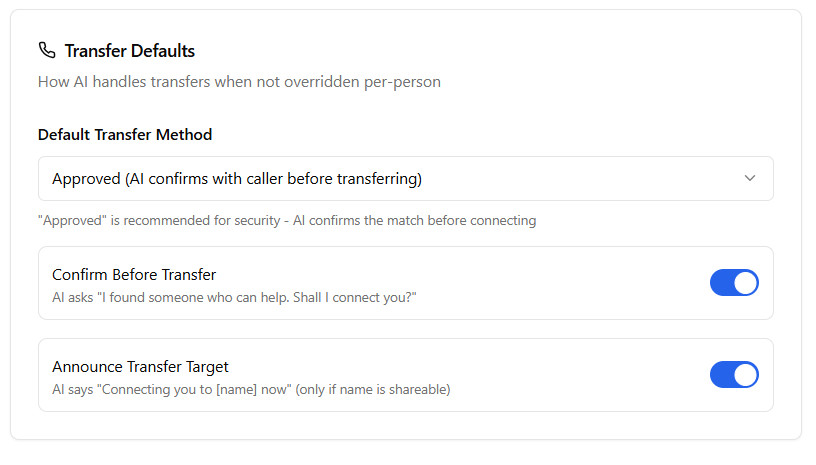
PhoneFlow handles this with two layers: account-wide defaults that keep your team consistent, and per-staff overrides that respect how each person actually works.
Set the baseline once. Every transfer across your account follows these unless a specific staff member overrides them.
Each staff profile can override any default, or stay aligned with it. The AI follows that person's rules for any transfer to them.
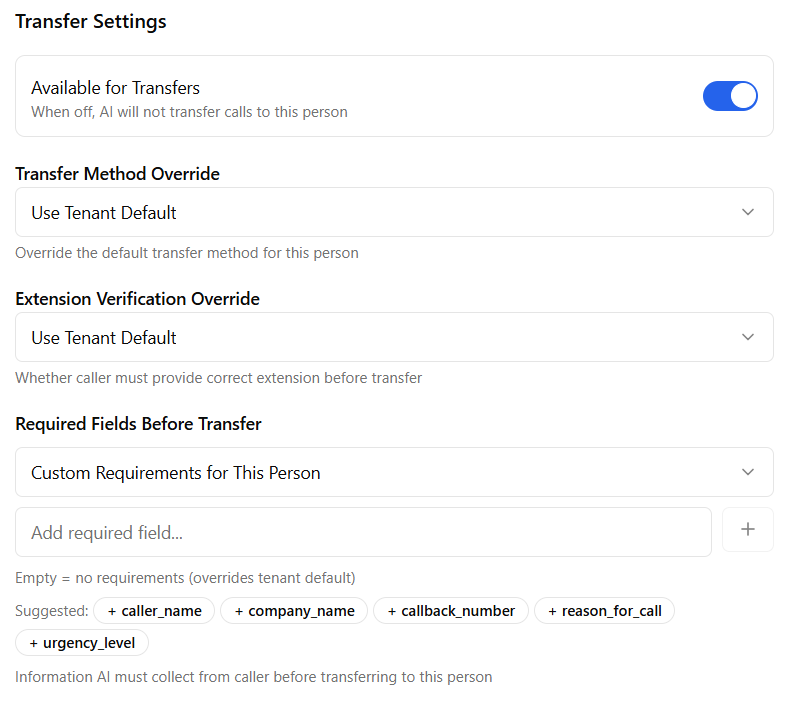
Nothing burns a transferee faster than a call that arrives cold. Their first question is "what's this about?" and the caller has to repeat everything they already said.
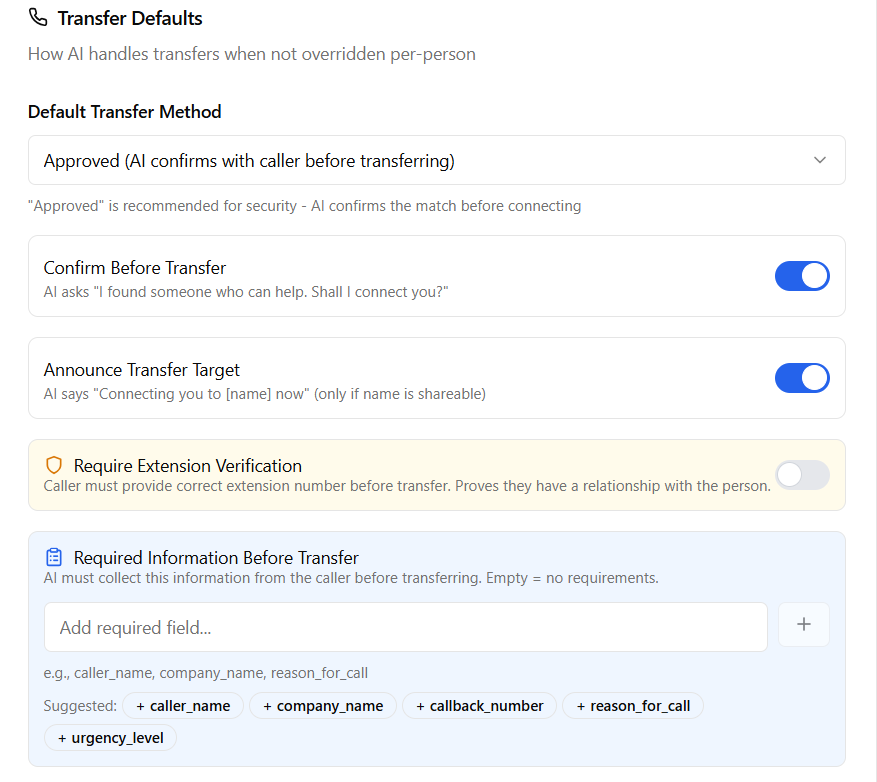
PhoneFlow's required-fields system lets you mandate any combination of:
If the AI can't collect what's required, say the caller refuses, the transfer is blocked and the AI gracefully redirects to message-taking. The transferee never gets a handoff they can't handle.
Every step honors your defaults plus per-staff overrides, automatically
AI gathers caller name, callback, reason, urgency, whatever you've required, before any transfer is initiated.
Searches your internal directory by name, title, department, or keywords. Filters out anyone marked unavailable.
If extension verification or approved-transfer is required, the AI confirms with the caller and the staff member before connecting.
Declined or unavailable? The AI takes a thorough message instead. Never a cold-bridged surprise transfer.
For high-stakes calls, the AI rings the staff member first and announces who's calling and why: "I have Jane Doe from ACME on the line about an invoice question. Are you available right now for the transfer?" and only connects if they confirm. Decline or no answer? The AI takes a thorough message instead. No more cold-bridged surprises.
Default tenant policy might say the AI can share names and departments. But Maria doesn't want her direct line shared. Flip one toggle on her profile and the AI offers to take a message instead. Privacy and routing, decoupled.
Need an extra layer of trust? Require callers to provide the correct extension number before the transfer goes through. Proves an existing relationship and stops social-engineering attempts cold.
Not just "transfer to extension"
Lawyers and accountants need privacy controls. Clients shouldn't get direct lines without permission. Per-person disclosure rules keep that boundary tight without slowing legitimate transfers.
Sales, support, and billing each have their own intake requirements. Account defaults keep the experience consistent; per-staff overrides let each team demand the info that matters to them.
Financial services, legal, and other businesses with strict info-disclosure rules can lock down who-shares-what at the individual level. No rebuilding the directory every time roles shift.
See how PhoneFlow handles defaults and per-staff overrides without making your phone tree a maze.
Get Your Free AI Receptionist